Actions
An action is the component that actually changes something on your layout. Actions are always located inside a section.
Execute conditions
Just like scripts and sections, every action can be conditional. You can configure whether all (AND) or only one (OR) condition must be met to execute the action.
Conditions can be based on accessories, feedback sensors, vehicle state, flags, variables, or camera detection. If the conditions are not met, the action is skipped and the script continues with the next action.
Custom label
Every action can have an optional custom label that appears alongside the auto-generated description. This helps you annotate actions to keep your scripts readable — for example, "slow down before curve" on a set speed action.
Action selector
Adding an action starts with tapping the + button inside a section. The action selector appears, allowing you to pick the desired action.
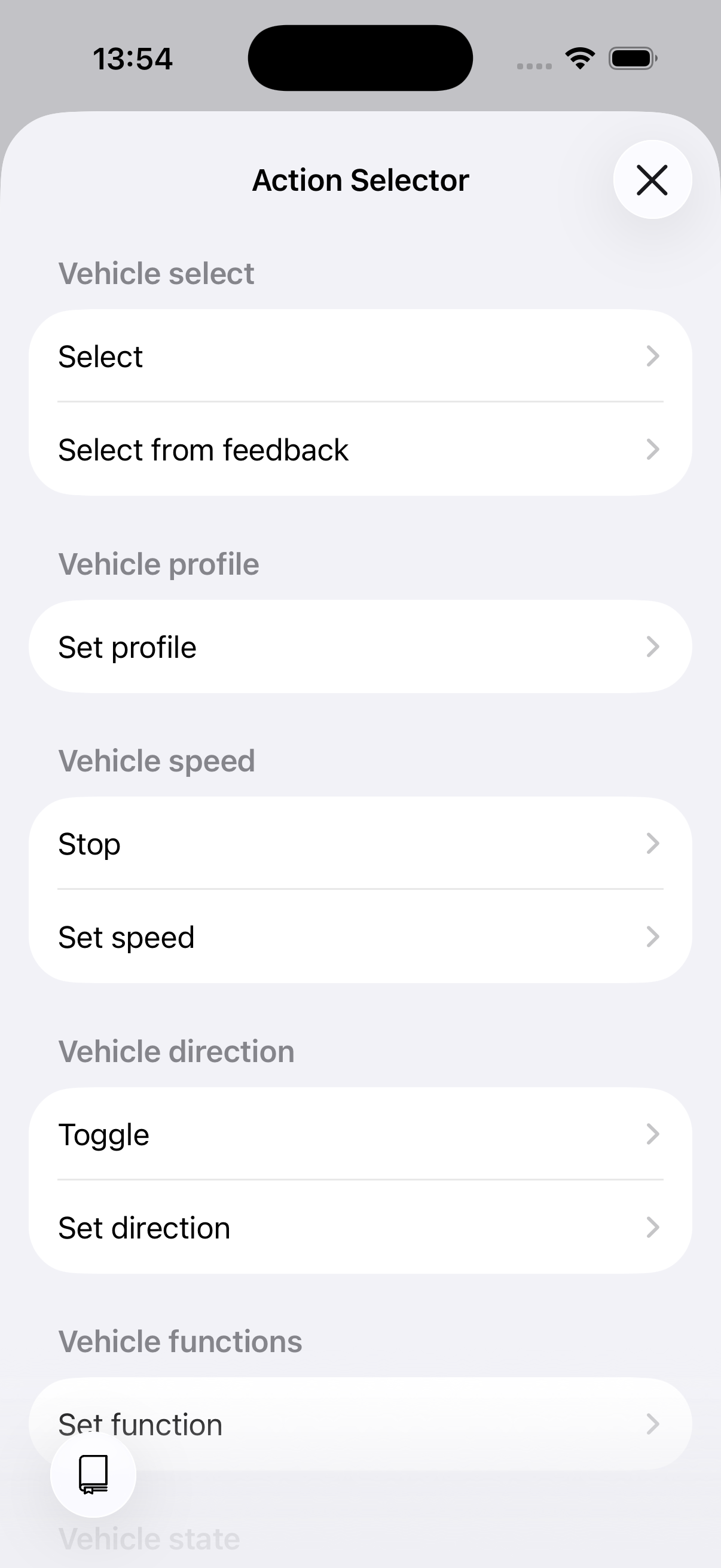
The action selector
Action types
Actions are organised into categories:
- Vehicle control — Select, drive, and manage your locomotives.
- Layout control — Control turnouts, signals, and other accessories.
- Timing — Wait for time or conditions.
- Structure — Execute scripts, set flags, variables, and notifications.
- Scenery — Play sounds and effects.
Overview
| Category | Action | Description |
|---|---|---|
| Vehicle | Select vehicle | Set the active vehicle for subsequent actions |
| Vehicle | Select from feedback | Select vehicle by reading a feedback sensor (RailCom) |
| Vehicle | Set speed | Set speed as a percentage (0–100) |
| Vehicle | Stop vehicle | Set speed to 0 |
| Vehicle | Set direction | Set direction to forward or reversed |
| Vehicle | Toggle direction | Reverse the current direction |
| Vehicle | Set function | Turn a vehicle function on or off (by icon or by function) |
| Vehicle | Set profile | Apply a vehicle profile (idle, shunting, slow, medium, fast) |
| Vehicle | Store state | Save the vehicle's current state |
| Vehicle | Restore state | Restore a previously saved state |
| Layout | Set accessory | Set an accessory to a specific state |
| Layout | Set route | Apply a predefined route |
| Layout | Set path | Automatically find and set a path through the layout |
| Timing | Wait | Pause for a fixed or random duration |
| Timing | Wait for condition | Pause until a condition becomes true |
| Structure | Execute script | Run another script inline (specific or random by tag) |
| Structure | Set flags | Set script-level flags |
| Structure | Set variable | Modify a variable (set, increase, decrease) |
| Structure | Show notification | Display an in-app notification |
| Scenery | Play sound | Play a sound (blocking or in background) |